
Poise Watch App
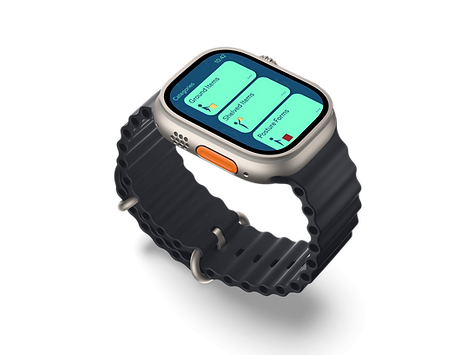
My first project of year 2 semester 1 in Ulster University, the purpose of the app is to help health care workers (Nurses and Health care assistants) improve and make aware of their posture, in general and during manual handling.
Project Brief
My task was to create a future possible realistic app, made specifically for a smart watch. My requirements was to choose a face screen of any size, and create it using Figma. The deliverables for this project are to have a minimum of 3 visual mockups, as well as a style guide if possible for the brand and the app.

My Idea
I really liked the idea of creating an app that could be used within the medical field. I thought a lot about how much manual handling goes into those jobs and how staff are taught to be careful of moving patients. This made me think about how they’re always taught to look after the patients but who Is looking after the safety of the medical staff?
In short, I wanted to create an app that is based around posture correction especially within manual handling.
Research
Looking into the apple health watch app, I noticed that it already does a fairly realistic imitation of what I want my app to do, which is mostly motion tracking as well as blood pressure, sweat and stress.
I noticed when looking for evidence that it a screenshot, shown here shows how the app recommended resting your arms or legs, which is fantastic to see. The reason I say this is that I thought finding already existing competitors for what I want my app to do was going to be next to impossible.
Knowing all this, It was extremely refreshing and reassuring that my app idea wasn't entirely impossible and was more realistic than expected. Following this, I was happy to know that I could rely a bit more on apple health for any inspiration designs or content ideas that would fit my app well.
Brand Development
Following choosing the name for my app, 'Poise', I really liked the idea of how yoga positions are designed for icons, they always look so sleek and you can still recognise the human as well as the position they're in. Keeping this in mind, I thought it would be a good idea to combine this with some some manual handling positions and, potentially make that into a logo.


Choosing my Colour Palette
My final step of developing my brand for my app is choosing my colour palette. I already had a fairly clear idea of what to choose to represent my brand, which was always going to be a sort of blue shades.
The reason for this choice is how to me blue always seemed to correlate well with the medical industry, such as blue gloves, face mask, as well as the uniform so it was a no brainer.

LO-FI Wireframe
My next step of development was to move my wireframe sketches in to Figma, straight to the basics. I lumped a punch of squares, rounded them off with 15px edges and created 5px spacing between each one. The reason for such small spacing was to create as much area as possible whilst still having a notable gap between. I luckily aimed to make my buttons large and considering this, didn't really have a need for big gaps.
As for any content in this LO-FI wireframe I only block in the essentials, such as titles, button tiles, dates and originally a scroll bar on the right.


HI-FI Wireframe
My next step was to begin adding detail to my Wireframe mockup. After I was happy enough with how my screen should look like as well as how many screens I plan on featuring. I began buy mixing in my typeface, colour palette and my icons, to see exactly what my bare frame will look like.
When adding my features into digital I really struggled to get back into the swing of things, following summer, especially when it came to design an app for such a small screen, which was new to me, but still had fun doing it.
When designing the app, I found it pretty difficult to make a little less boring and repetitive and wanted to add a little more to it but less subtle. For this I thought it would be nice to faintly add my logo into the background/ wallpaper, adding a little more detail to my design.

Poise App Prototype
A button that brings you straight to the prototype for the Poise app. Made in Figma, due to the time frame of the project it's not a fully functional prototype but more of a preview.
Click here to see the wireframe !
